
Building my own code typing game
6 min read
Typing games are fun, so I built one with real code, more languages, multiplayer races, and solo practice.
Why I built a code typing game
I like typing games because the rule is clear. Type the shown text correctly and try to improve the result. A short run gives useful feedback without a long setup.
Most games use words or normal sentences. I wanted to type source code instead. Code includes indentation, brackets, punctuation, and patterns that developers use during normal work.
I also wanted more than one kind of run. My list included several programming languages, difficulty levels, a leaderboard, multiplayer races, and solo practice. That idea became KeyRace.
The start screen only asks for a language, a difficulty, and a player name. A player can create a lobby, join with a code, or start solo practice. An account is not required before the first run.
I kept the first screen focused because every extra form field delays the part that matters. A lobby code is enough for a private race. Solo practice remains available when no other player is ready, so the application is still useful during development and testing.
Code changes the typing rules
A code snippet must look like code from a real file. Random words with brackets would not provide the same task. Names, indentation, and structure need to make sense together.
Different languages also produce different typing patterns. JavaScript uses braces and semicolons. Python uses indentation as part of its structure. The difficulty setting changes the length and complexity of the snippet.
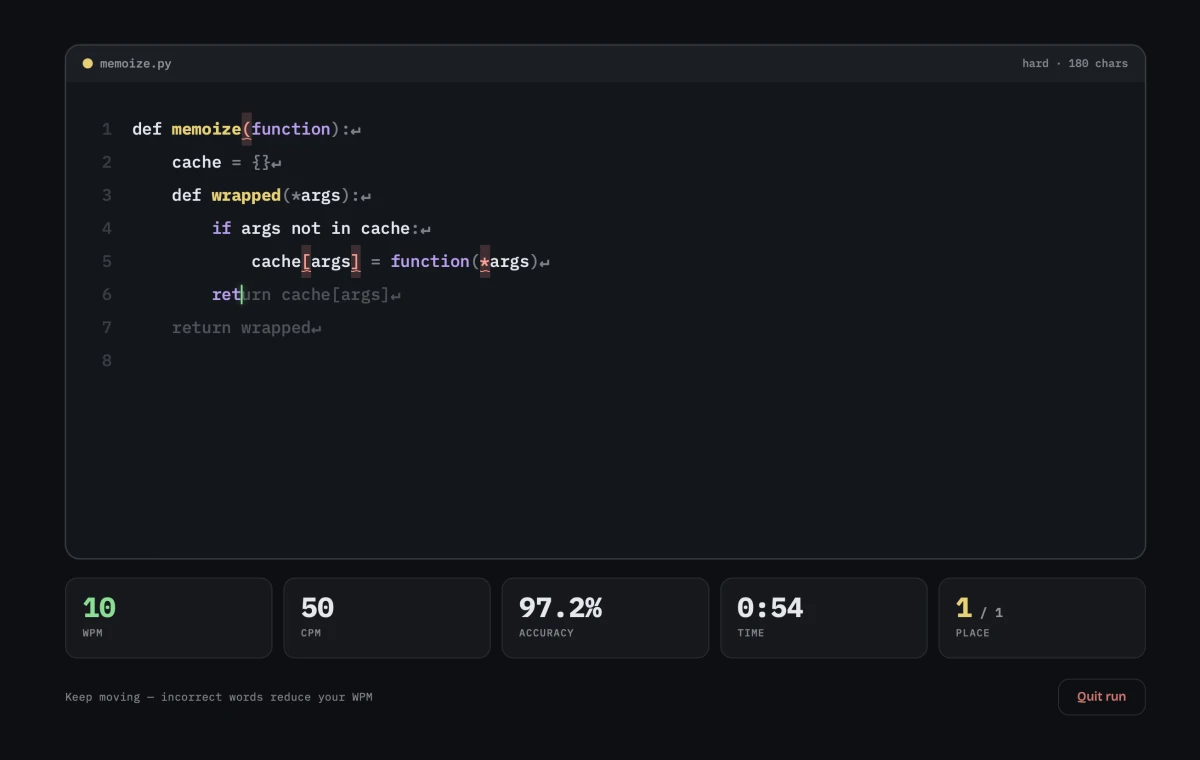
The player types from left to right. A correct character moves the cursor forward, while a wrong character shows an error. Spaces, tabs, and line breaks count because they are part of the code.
The Angular client renders correct text, wrong text, pending text, and the current cursor as separate states. It also updates words per minute, characters per minute, accuracy, elapsed time, and race position without moving the code area.
Syntax colors make the snippet easier to read, but they do not change the comparison. The typing engine still checks the exact character at the current position. A visual token can be purple or yellow while its spaces and punctuation remain part of the result.
The browser and server have different jobs
Solo practice can keep most state in one browser. Multiplayer cannot, because every player has a separate connection and may receive messages at a different time.
The Quarkus server uses WebSockets for live race events. It keeps the shared lobby state, receives player progress, and sends updates to the players in that race.
The browser checks each key immediately. Waiting for a server response after every character would make typing feel slow. The client sends progress updates after local input, and the server uses them for the shared position.
This division keeps the main action responsive. The browser owns immediate visual feedback, while the server owns facts that every player must share, such as the start and the final order.
The connection also needs simple recovery behavior. A closed tab or lost socket must not leave an active player in the lobby forever. The server removes inactive connections and sends the changed lobby state to the players who remain.
Multiplayer needs one shared result
Network messages do not arrive at the same time for every player. One connection can be slower, and two players can finish close together. A local clock cannot decide the result for the whole lobby.
The server decides when a race starts and who completes it first. Clients can show an estimated place during the run, but they do not choose the official order.
KeyRace is a small game, not a large competitive platform. It does not try to solve every form of cheating or provide global matchmaking. The important part is that players in one lobby use the same race state and receive the same final result.
Keeping that boundary helped me avoid adding systems that did not improve the first game. A shared start, live progress, and one result were enough to make multiplayer useful.
The interface shows place during the run because it gives the player context, but speed and accuracy remain visible as separate values. A fast result with many errors should not look identical to a clean run. The final record therefore needs more than one number.
Solo practice and stored scores matter
A multiplayer lobby is not always available. Solo practice lets a player start at any time and learn the typing view before joining other people.
The practice mode uses the same snippets and statistics as a race. This keeps the results comparable and avoids a separate typing engine.
PostgreSQL stores completed leaderboard results. Live character input does not belong in the database because it changes often and only matters during the current run. Lobby data can also stay in active server memory.
This split gives each data type one purpose. The active state runs the current race. Stored results remain available after the race ends and give players a reason to return.
The leaderboard also made the language and difficulty choices more important. A short easy JavaScript run should not silently replace a harder Python result in the same comparison. The stored result keeps enough context for the list to explain what the player completed.
Deployment is part of the game
KeyRace has an Angular front end, a Quarkus back end, and PostgreSQL. Docker Compose starts these parts as one system.
Caddy handles TLS, nginx serves the built Angular files, and Quarkus provides the API and WebSocket connection. The browser uses one public origin for the site, API, and WebSocket path.
This project showed me that a simple game rule can still require careful boundaries. Local typing feedback, shared race state, stored results, and the public network setup all affect the same run.
The most useful decision was to keep local input separate from the official result. A key press must feel immediate. A race result must be consistent. Once those jobs were clear, the rest of the system was easier to reason about.
Deployment exposed faults that did not appear when every service ran on a development machine. The WebSocket path, proxy rules, and secure connection all had to agree. Treating that setup as part of the game helped me test the same route that a real player uses.