
Why I built TODO Manager
8 min read
I wanted one place for every TODO, FIXME, and HACK comment in a JetBrains project.
Why I built a JetBrains TODO plugin
I use TODO comments when I find work that does not belong in the task I am doing. A short note lets me record the issue and continue. It is quicker than leaving the editor, opening another application, and creating a formal ticket for a small piece of work.
The problem comes later. The comment stays in the file where I wrote it. A project can contain TODO, FIXME, HACK, NOTE, BUG, and WARN comments across many folders. The IDE can search for them, but I wanted a view that also showed why each item mattered and where it belonged.
I did not want to build another issue tracker. A source comment is useful because it sits next to the code that needs attention. My goal was to keep that advantage and add a project view on top of it. The source file had to remain the main record.
The first version therefore had one complete path. It had to find a comment, show it in a list, and open the correct source line. I built it with Kotlin, Gradle, and the IntelliJ Platform SDK. Each item started with only the text, keyword, file path, and line position.
That small scope gave me something I could test in a real project. It also exposed the main design question early: how can a tool collect comments without turning them into a second set of tasks that can become out of date?
A useful list must open the source
A plain text search can find a word, but it does not produce a useful work list by itself. Generated files and external code can contain comments that the user cannot change. Teams can also use different keywords. The scan therefore needs project settings, not one fixed pattern.
TODO Manager lets the user configure the keywords and the paths that belong in a scan. The default set covers common comments, but a project can add its own terms. Include and exclude paths keep generated output, dependencies, and other noise out of the result.
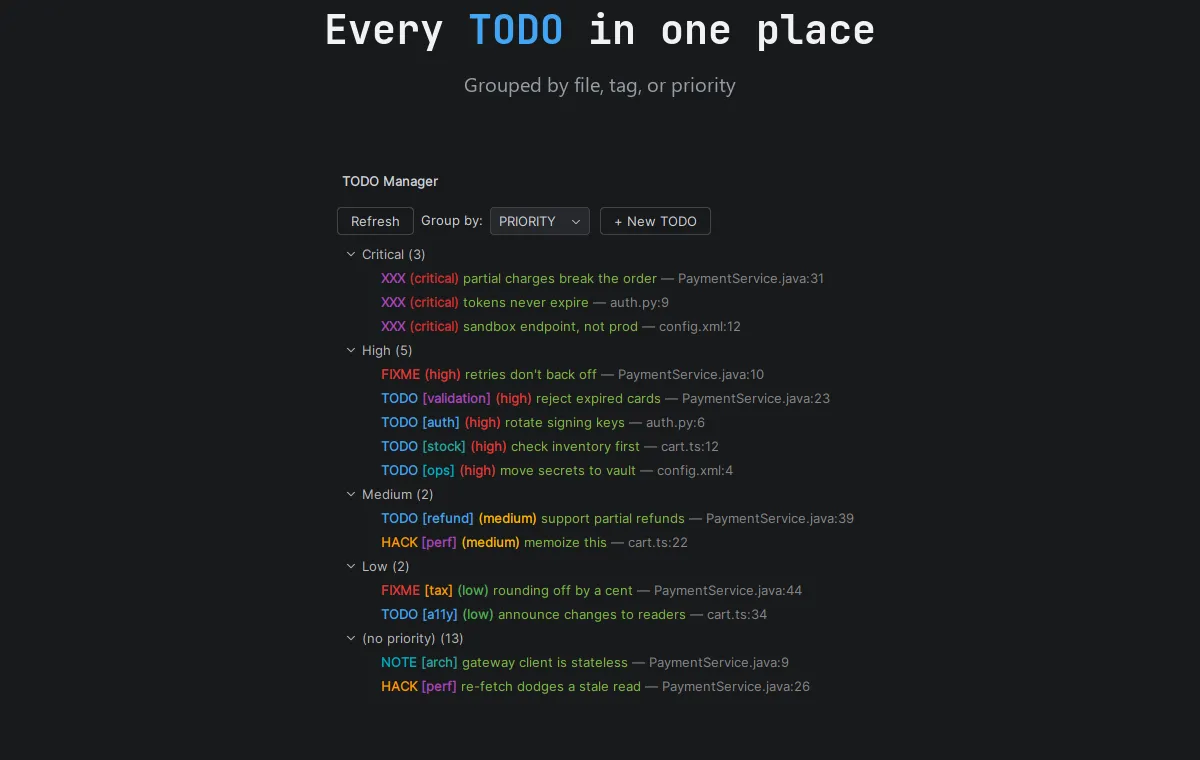
The tool window is the main view. Each row shows the comment text with its keyword, priority, tag, source file, and location. A click opens the file and moves the editor to the correct line. The user does not need to copy part of the comment and search for it again.
Grouping became important as soon as I tested the plugin on a larger codebase. One long list hides the structure of the work. A user can group items by priority, keyword, tag, file, or another supported field. Sorting and filters then reduce the list to the part that matters now.
Direct navigation was more important than adding many fields. A project view only helps when the next action is clear. For this tool, the next action is usually to inspect the code. Opening the right line turns the list into an entry point instead of a report.
The list and source must stay in sync
I did not want the tool window to store a separate copy of a comment. Two copies create a simple but serious problem: one can change while the other stays old. The user then has to decide which value is correct.
When a user edits an item in the tool window, the plugin changes the source comment in place. When a user changes the comment in the editor, the tool window refreshes the item. Both actions work on the same underlying text.
This two-way update changed how I thought about the feature. The list is not a small task database. It is another editor for information that already belongs to the source file. The plugin must use normal document operations and respect changes made by the IDE.
Line positions also move. A comment can shift when code is inserted above it, and a file can be renamed or moved. Saving only the line number is not enough for a long-running view. The plugin needs to follow the document state and rebuild data when a stored location is no longer valid.
This work took more time than drawing the list. The visible interface is simple, but its value depends on the data being current. A stale item that opens the wrong line makes the whole view hard to trust.
Real projects need filters and settings
A JetBrains project can contain Java, Kotlin, XML, JavaScript, configuration files, and other formats. The comment syntax can change, but the purpose of a TODO stays similar. I wanted the plugin to work in mixed projects instead of supporting one language only.
The editor also needs to show the meaning of a comment before the user opens the tool window. TODO Manager gives keywords and priorities clear colors. The same colors appear in the source and in the list, so a critical item does not change meaning between views.
A default palette helps the first run, but it cannot match every editor theme or team rule. Users can change the colors, keywords, grouping, scan paths, and display options. The plugin stores these choices with the project settings.
Settings need safe defaults and stable names. If a later update changes an internal option, an existing project should not lose its configuration. This is less visible than a new button, but it matters more to someone who uses the plugin every day.
The plugin still has a clear boundary. It manages comments inside the current project. It does not add assignments, remote teams, due dates, or a hosted database. Those features belong in an issue tracker. Keeping that boundary makes the source workflow easier to understand.
Completing a TODO should leave a record
Deleting a finished TODO is often correct, but it is not the only useful result. Sometimes a team wants a short record of who completed the work and when it happened. The source history can then explain why the note changed.
TODO Manager can complete an item and add the Git user and date to the source comment. The information comes from the project environment, so the user does not have to enter it for every item.
The result remains ordinary source text. It appears in version control and in a later code review. The plugin does not create a private completion log that other developers cannot see.
I kept completion separate from deletion. Removing a comment should remain a deliberate edit. Adding completion details gives the user another option without changing the source automatically.
This feature is small, but it follows the main rule of the project: useful information should stay near the code. The tool can help write that information, but the repository should keep it.
IDE changes are the hard part
An IDE does not hold still. Documents change, files open and close, folders appear, project indexes update, and version-control operations can replace many files at once. A plugin must respond without making normal editor work slow.
A full scan is useful when the project opens or the configuration changes. It is wasteful after every small edit. The plugin needs to refresh affected data, delay repeated work when necessary, and keep user-interface updates on the correct thread.
This was the part where the IntelliJ Platform SDK mattered most. The plugin lives inside a larger application with its own document and project life cycle. Code that works in a small test can still cause trouble if it reads an index at the wrong time or performs too much work during typing.
I tested common changes such as editing a keyword, moving a comment, renaming a file, and changing a scan path. These tests were more useful than checking only the first project scan. They covered the state changes that happen during normal use.
The lesson was direct: an IDE plugin is an integration first and a user interface second. The list can look finished while the update logic is still incomplete. Reliable refresh behavior is what makes the tool suitable for daily work.
Publishing changed the project
I published TODO Manager on the JetBrains Marketplace. That changed it from a plugin I could repair for myself into a product that other people needed to install, update, and understand.
A release needs a version number, plugin metadata, release notes, and a build for the supported IDE versions. An update must preserve settings from the previous release. Compatibility checks became part of the work, not a final task after development.
Documentation also became more important. A user needs to know what the plugin scans, how to open the tool window, and which settings can reduce unwanted results. If the first run is confusing, the implementation behind it does not help.
I now test the packaged plugin in an installed IDE instead of relying only on the development instance. I check navigation, editing, stored settings, and project reopen behavior. These checks cover the path that a Marketplace user will follow.
The first idea was only to put project comments in one place. The finished plugin taught me more about state, compatibility, and maintenance than about drawing an IDE panel. That is why I still value the narrow first scope. It gave me one reliable workflow before the project grew.